智能裁切大师 PRO
Batch crop, compress and convert images in Eagle. Smart framing places crops on the subject, and you can set output dimensions and a per-file size limit. Results export as new items.
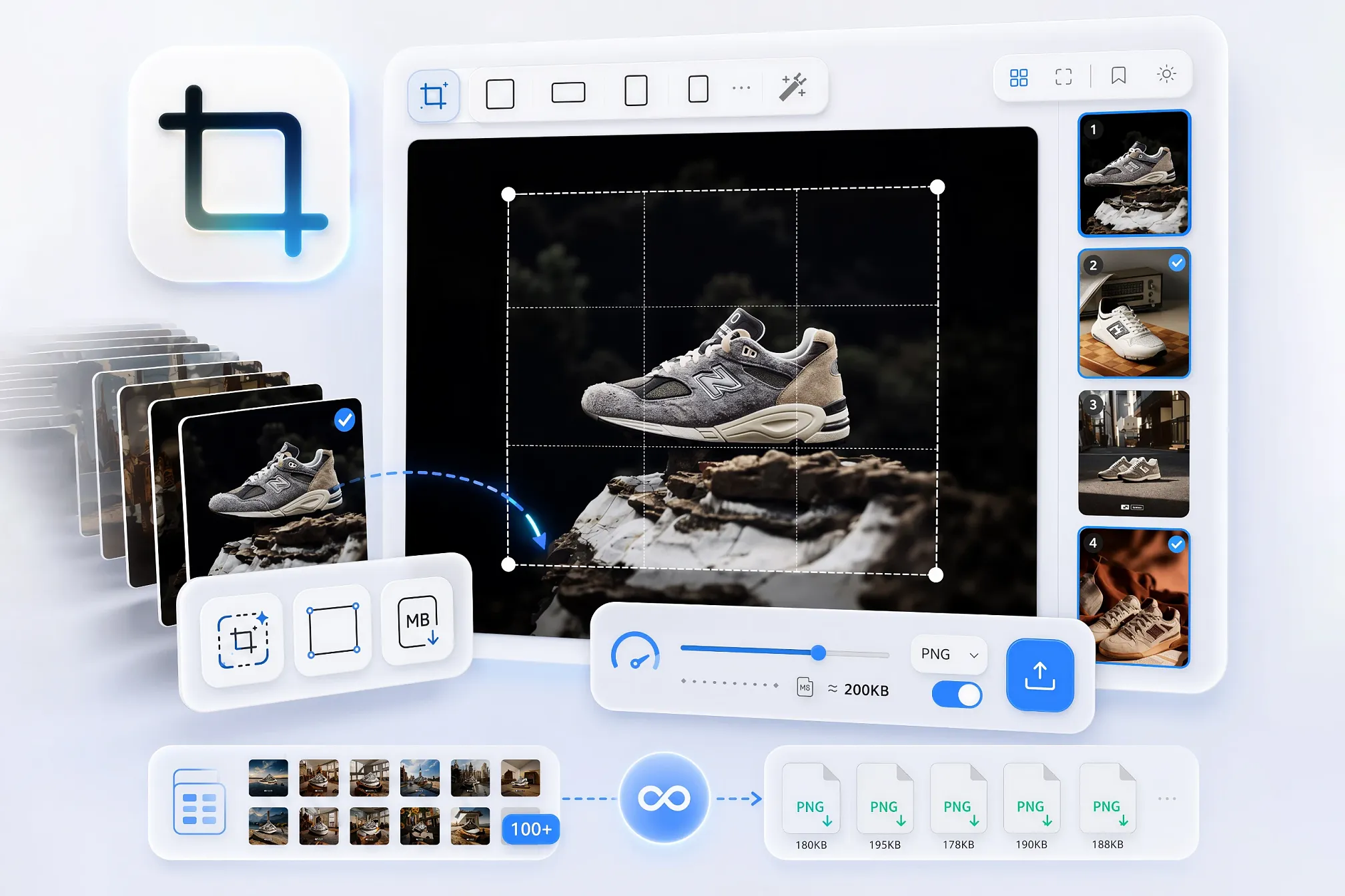
Smart Crop Master PRO batch-processes the images you select in Eagle: crop, compress, convert.
Everything runs locally. Results are added as new Eagle items and never overwrite the originals.
What each setting applies to
There are two kinds of settings. Knowing which is which saves a lot of confusion.
Per-image adjustments — only affect the images you currently have selected:
- Crop ratio and crop box
- Rotate and mirror
- Smart framing
Output settings — apply to the whole queue, regardless of what is selected:
- Format and quality
- Proportional scaling and output dimensions
- Per-file size limit
- Export
Export processes every image in the queue in turn. If you do not want to export an image, remove it from the queue first — select it, then click remove.
Main features
- Smart framing — places the crop box using image detail and colour distribution, and flags the images worth reviewing first.
- Independent crops — every image remembers its own ratio and box; switching away and back does not lose it.
- Original ratio — skip cropping and just compress or convert.
- Presets — built-in sizes for common platforms, plus your own saved output settings.
- Metadata is kept — new items land in the original's folder and inherit its tags, annotation and link.
- Large batches stay smooth — the filmstrip is virtualised, and only the image on screen is decoded at full resolution.
Animated GIFs
Animated GIFs are processed frame by frame and stay animated only when the output keeps the GIF format.
Converting to any other format produces a static result — the first frame only.
Animated GIFs kept as GIF do not support the per-file size limit.
GIFs beyond the safe processing limit — oversized file, oversized canvas, too many frames — are skipped with a message rather than stalling Eagle.
Keyboard
↑↓or Space — previous / next imageS— sync the current crop box to the selected imagesTab— jump to the next image worth reviewingCtrl/⌘+Z— undo
Turn on "jump to next after adjusting" and the whole batch becomes pure dragging.
Steps
- Select images in Eagle and open the plugin. They become the processing queue.
- In the filmstrip on the right, select the images you want to adjust.
- Set a crop ratio, drag the crop box, or use smart framing, rotate and mirror.
- In the bottom-right panel, set the output format, quality, scaling, dimensions or per-file size limit.
- Remove any images you do not want to export from the queue.
- Click Export. Every image in the queue is processed in turn and added as a new item.
About file-size limits
Regular images: the plugin makes a limited number of quality and dimension adjustments to try to meet the cap you set.
Very small targets may not be achievable. In that case it exports the smallest result it can produce and reports afterwards how many images fell short.
Animated GIFs: those kept as GIF skip the size limit, and a notice appears when the export finishes.
Rebuilt interface
- One large preview plus a filmstrip on the right — you can see what you are cropping.
- Tools moved into floating capsules and the parameter column is gone, giving the image roughly 40% more room than in 1.1.
- Motion is spring-driven throughout: interruptible, velocity-aware, continuous. No more hard cuts or stutter.
- Layered frosted-glass materials, light and dark themes, following Eagle's own appearance setting.
New
- Smart framing, with a "needs review" marker so a large batch leaves only a few images to check.
- Per-image size cap — quality first, resolution only if that is not enough; if the target cannot be reached within a limited number of attempts, the smallest achievable result is exported and reported. Not available for animated GIFs kept as GIF.
- Animated GIF support — when the output keeps the GIF format, frames are processed individually and frame delays, loop count and transparency are preserved; converting to another format produces a static image.
- Undo and redo (Ctrl / ⌘ + Z), so a mistaken batch operation can be rolled back.
- A crop box and ratio per image, kept when you switch away and back.
- "Original" ratio — one click for "don't crop, just compress".
- Presets — built-in sizes for common platforms, plus your own.
- Interface available in 8 languages.
Important fixes
These affected the files you exported.
- Rotation cropped the wrong region — the old version rotated first, then cropped using un-rotated coordinates, so any image turned 90° came out of the wrong place. Out-of-range coordinates were silently clamped instead of reported.
- EXIF orientation was ignored — portrait shots straight from a camera were cropped incorrectly and exported on their side.
- Colour profiles were discarded — wide-gamut images (Display P3, Adobe RGB) came out visibly off-colour.
- "Original" format produced broken files — PNG data was written into .gif and .bmp.
- JPEGs were compressed twice — an extra encode on every export, for no reason.
- Transparent PNGs turned black when converted to JPG; they are now flattened onto white.
- Files whose names contain characters such as # were silently dropped; you now get a clear message.
Also
- Rewritten on plain Chromium with no native modules, so macOS (including Apple Silicon) now works properly.
- GIFs are decoded one frame at a time, with the memory budget checked against the file header before any pixels are decompressed. Malformed or oversized GIFs are skipped instead of stalling Eagle.
- Removed the unused network permission; the plugin runs entirely offline.
- Export can be cancelled at any time, and failures are reported with the file name and reason.
- Exported copies inherit the original's tags, annotation and link — not just its folder.
Version Log (1.0.0)
🎉 Initial Release.
✨ Integrated AI subject detection algorithm.
✨ Added batch cropping with waterfall preview.
✨ Added fixed-size export feature.
✨ Multi-language support.
You may also like