Video Tile-kun Service
Background service: auto-generate video tiles when videos are imported. Uses Video Tile-kun inspector settings and outputs compatible with Video Tile-kun.
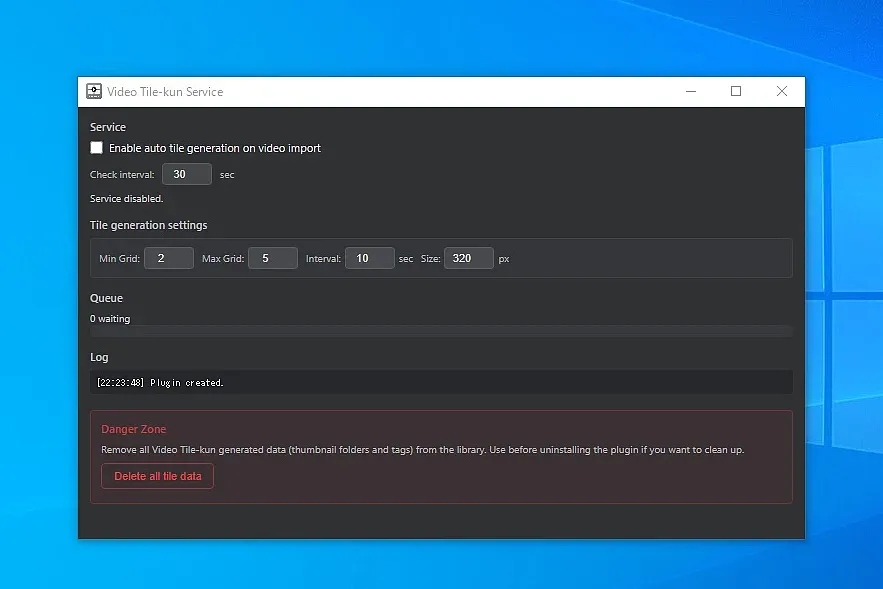
A background service that automatically generates Video Tile-kun thumbnails whenever videos are imported into Eagle. No manual step required — tiles are ready the moment you open the Inspector.
> **Companion plugin:** Generates tile data in the background, but has no built-in viewer. To view the tiles, install **Video Tile-kun** (Inspector) or **VideoTileKun Player**.
**Features:**
- Enable/disable auto tile generation with a single toggle
- Watches for newly imported videos; existing items are not reprocessed
- Configurable settings: Min Grid, Max Grid, Interval (sec), Size (px), Check interval (sec)
- Queue and processing log visible in the service window
- Output is fully compatible with Video Tile-kun (`.video-tile-kun/meta.json`)
- Danger Zone: clear all tile data for the library in one step
**Requirements:** Eagle 4.0+, FFmpeg plugin, and one of: **Video Tile-kun** (Inspector) or **VideoTileKun Player**
Tested on Windows. macOS compatibility has not been verified — feedback welcome.
I built this so tiles would just be there whenever I opened the inspector — no thinking required. Enable it, forget it exists. Just don't forget to leave a review. ⭐
Bugs, ideas, and feature requests are always welcome: https://github.com/animtools/eagle-plugin-support/issues
Initial release. Background service that automatically generates Video Tile-kun thumbnails
on video import. Configure grid size, interval, and check interval from the service window.
You may also like