Synch List Comparator
A powerful extension that lets you easily compare a list of your choice with the list of files in your Eagle Library
We’re always trying to make our Eagle Libraries better —
adding new files, deleting the unnecessary ones, and keeping everything efficient without wasting space.
And of course, if we want to use our library at peak efficiency, we can’t have duplicate files!
Thanks to Eagle’s built-in duplication check, most identical files are easily detected and filtered out.
However, slightly different versions of the same file can still slip through, leaving us with hidden duplicates in our library.
Sure, you can try sorting, filtering, or organizing files manually — but sometimes you just wish there were a simple way to see all files with the same names at once, right?
Let’s look at another common situation 👇
You already have 100 files in your library,
and now you’ve found a new, updated resource pack containing 200 files —
which includes all your existing 100 files plus 100 new ones.
At this point, you have three choices:
1️⃣ Delete your current 100 files and import all 200 new ones.
2️⃣ Keep your 100 files, import all 200 anyway, and hope Eagle’s duplication check filters out the duplicates.
3️⃣ (Jokingly) Do nothing and give up. 😅
Realistically, we all end up choosing option 1 or 2 — importing all 200 files.
But have you ever thought, “What if I could import only the 100 new files that I don’t already have?”
Clearly, that’s the most efficient approach.
But comparing 200 files manually against your library to find only the new ones?
That means doing 200 Ctrl + F searches — maybe doable once,
but what if it’s 2,000 files, or you have to do it every day?
You’d probably just say, “Forget it, I’ll download them all.”
Now imagine those 200 files aren’t just a few hundred MBs —
but tens or hundreds of GBs, maybe even a whole terabyte!
That’s a serious dilemma:
spend endless time manually comparing, or waste time and space downloading everything again.
That’s where Synch List Comparator comes to the rescue 💡
⚙️ What Does Synch List Comparator Do?
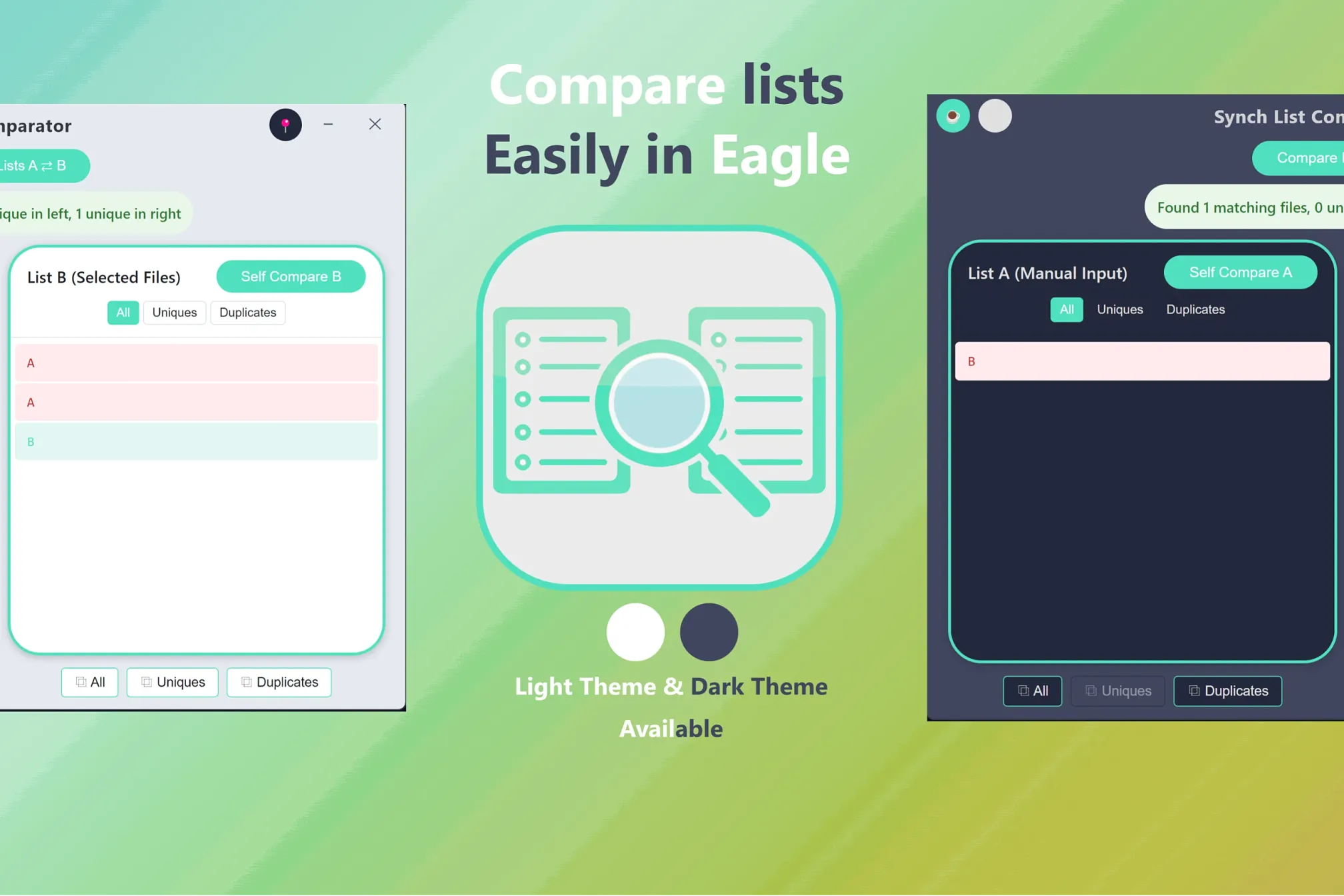
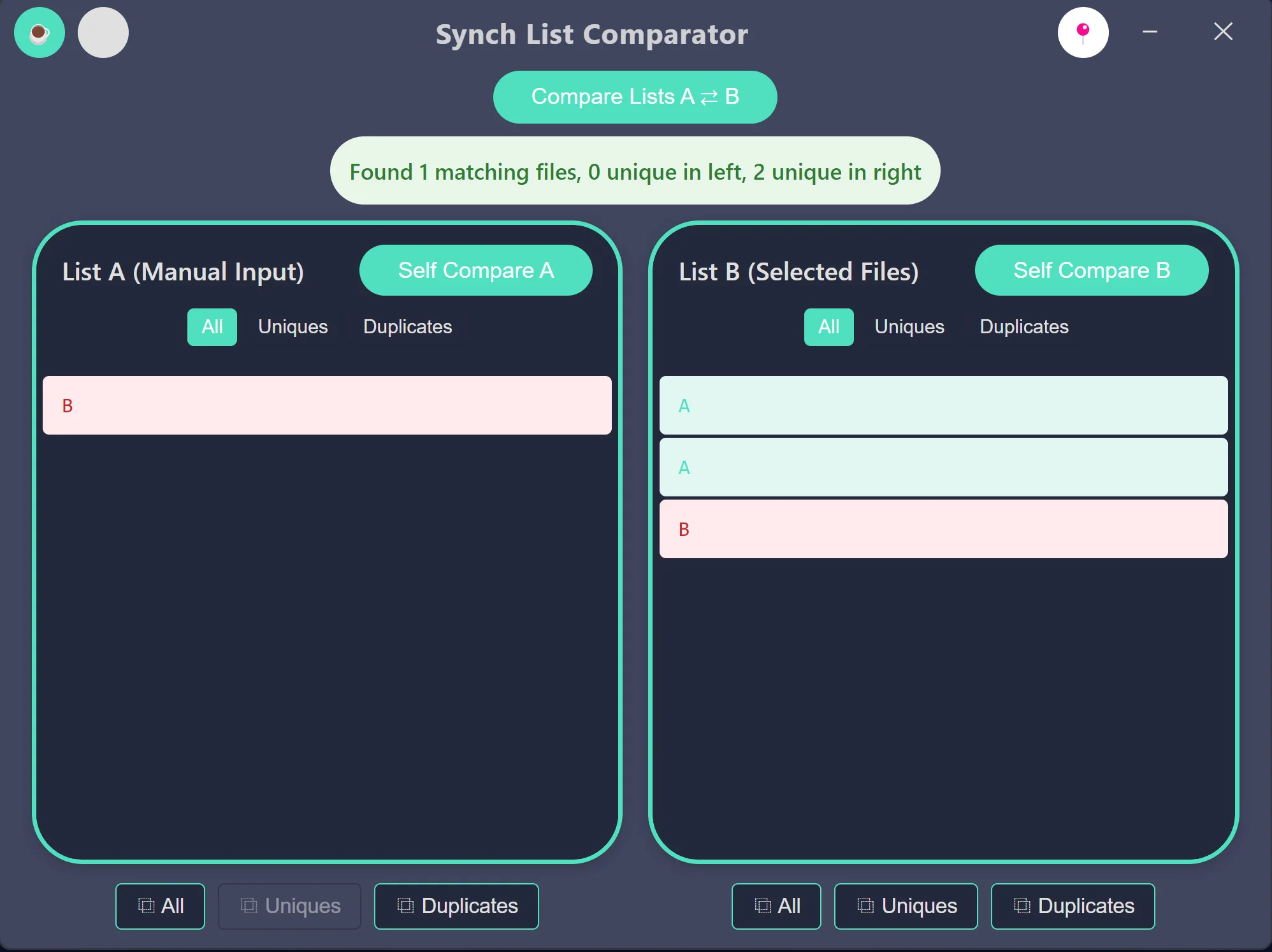
In simple terms, Synch List Comparator lets you compare any list of files with your Eagle Library.
-
The right list shows files you’ve selected directly from Eagle.
-
The left list is for a custom list you can type or paste in to compare against.
After filling both lists, just click “Compare Lists A ⇄ B” — and the magic happens ✨
-
Files that exist only in one list are highlighted in cyan (Unique).
-
Files that exist in both lists are highlighted in red (Duplicate).
Remember our earlier example?
If you already have 100 files and the new pack has 200,
you’ll instantly see which 100 are new —
without doing 200 Ctrl + F searches!
🔁 Self-Compare Function
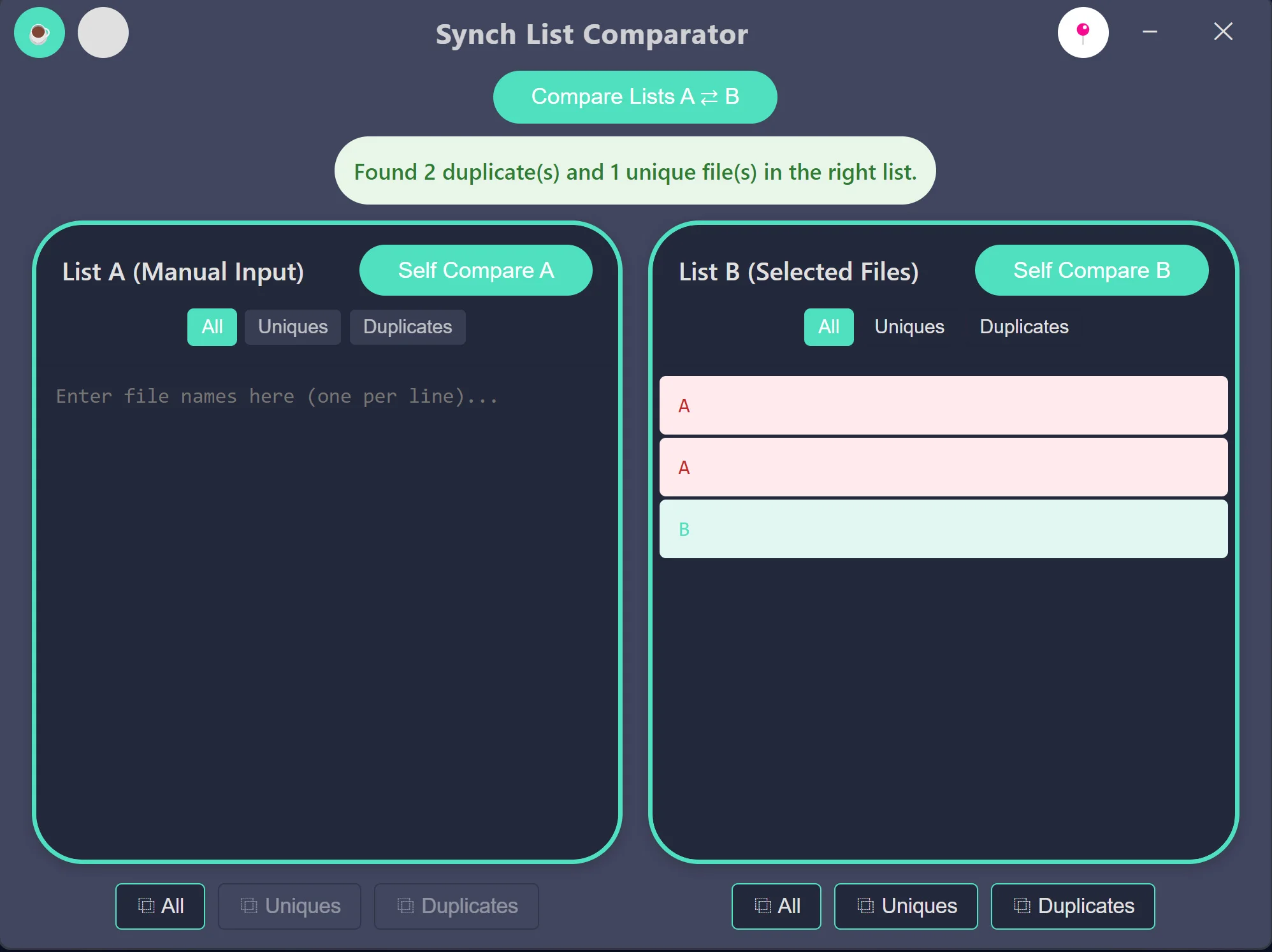
That’s not all — the extension also includes a Self-Compare feature.
When you select files in Eagle and open the extension,
you’ll see them in the right list.
Click “Self Compare”, and it will analyze duplicates within that same list:
-
Files appearing only once are highlighted in cyan (Unique).
-
Files appearing more than once are highlighted in red (Duplicate).
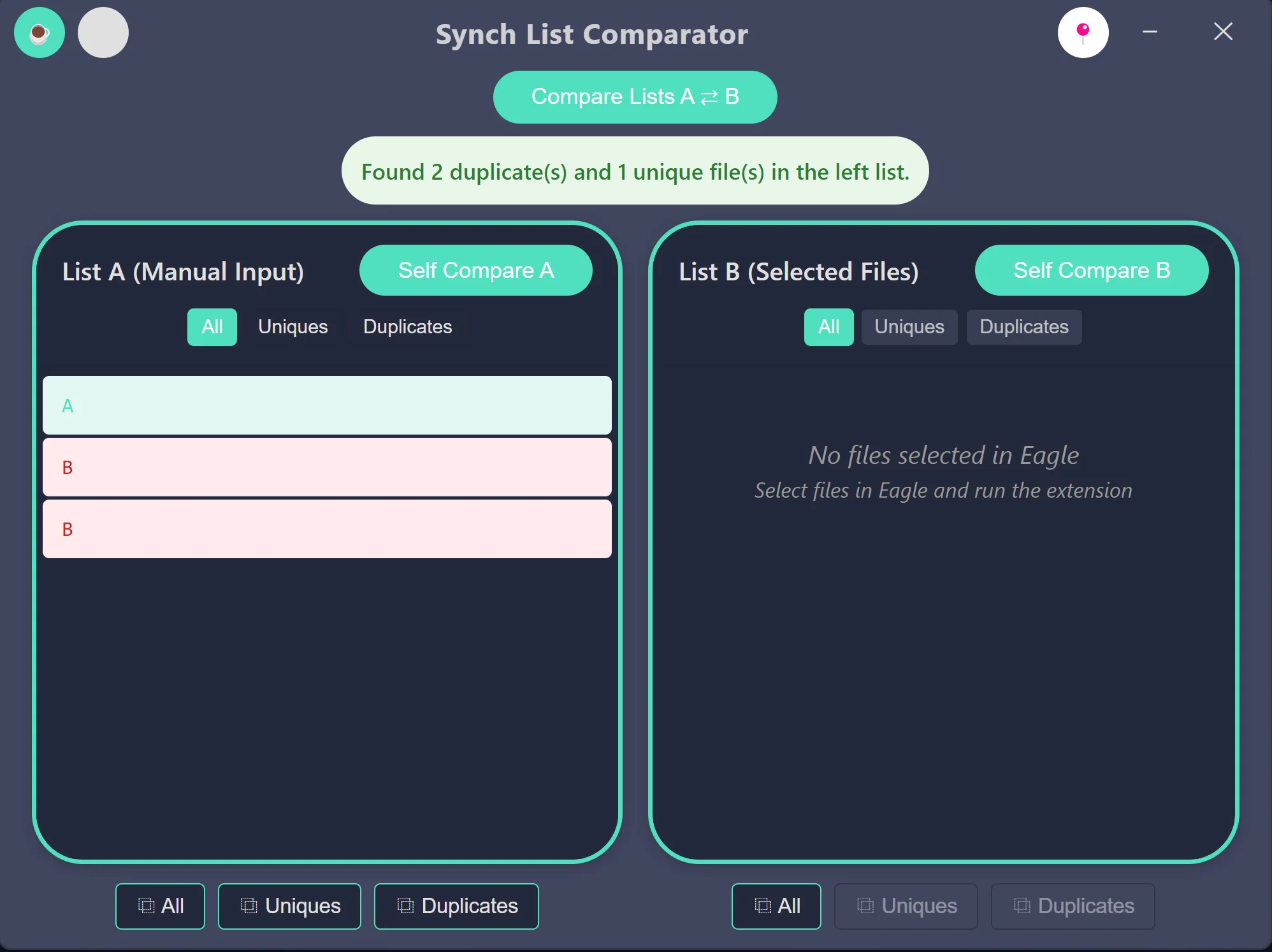
You can also paste an external list into the left panel and use Self Compare the same way —
the results follow the same color-coding.
After comparison, you can filter and copy only the Unique or Duplicate results
using the handy Copy buttons located under each list.
That makes exporting results quick and easy.
🚀 Efficiency at Its Best
Personally, I use these exported results to download only the files my library doesn’t already have —
saving space, time, and keeping my Eagle Library running at peak efficiency.
And beyond the examples above,
there are countless other creative ways to use Synch List Comparator
to manage your Eagle Library smarter than ever.
Q & A
Q: What is the coffee button? ☕
A: It's a "Buy me a Coffee" button where you can donate money to support the extension.
Don't worry—clicking that button won't immediately charge you anything. It will simply open my Buy Me a Coffee page at https://buymeacoffee.com/synch where you can choose to make a donation if you'd like.
Q: "Hovering on title bar's button makes a windows appearing that is saying "Status : Lite" what is this ?"
A: It means you are using the Free Lite version. Don't worry, it's absolutely normal. This extension you got from Eagle's plugin center page is the Free, Lite version.
Q: Lite? So there's a Pro version too?"
A: No! This Synch List Comparator doesn't have a Pro version planned yet.
But maybe in the future, a Pro version might be created 🤫 but the Lite version will always be provided for free, FOREVER!
Known Limitations (Important ✅️)
The extension is intended for a single comparison per launch.
To start a new comparison, simply close the extension windows and relaunch the extension.
⚠️ Important Disclaimer
This extension does not delete or modify any data itself.
However, based on the comparison results shown in this extension, you may choose to delete or modify files yourself.
I’ve tested the comparison feature thoroughly 🧪 and confirmed that it works as intended,
but there can always be exceptions — nothing is ever 100% perfect. 💡
Therefore, I cannot take responsibility for any data loss or unintended changes caused by actions you take based on these results.
👉 Before making any important decisions such as deleting or modifying files, please double-check the results yourself! ✅
- Compare custom lists with files in your Eagle Library.
- Compare lists within your Eagle Library.
- Compare multiple custom lists with each other.
- Filter comparison results to show only unique or duplicate items.
- Copy unique or duplicate results to the clipboard.
- Light Theme & Dark Theme
- Responsive Design
- Pin on Top
You may also like